
Forge
Create 3D Asset
Built With Babylon.js
Turn your website into an interactive space.
Build complete websites, interactive 4D spaces, and realtime experiences from one platform — with visual tools, team collaboration, usage-based pricing, and a scalable runtime that works on your own domain.
Next-generation Web builder
Run on your own domain
VR-ready out of the box
Real-time team collaboration
Usage-based pricing. No monthly fees
Start with $30 in free tokens
ENGINE POWER, SIMPLIFIED
Built for scale. Designed for control.
From realtime synchronization to scene streaming and distributed asset delivery, the systems behind GEM are designed to keep large interactive worlds responsive and under control.
The hard parts are already handled.
GEM brings the platform pieces together so your team can build immersive online worlds without stitching the stack together yourself.
- User authentication
- Profile management
- Bot protection
- Analytics
- Website Builder
- Email notifications
- SMS notifications
- SEO metadata
- Two-factor Auth
- Website embeds
- Scene publishing
- Version control
- CDN asset hosting
- Data caching
- Load balancing
- Background queues
- Asset processing
- Asset library builds
- 3D model delivery
- Texture delivery
- Image libraries
- Audio hosting
- Runtime configuration
- Scene launch flow
- Loading screens
- Image Compression
- Performance Monitoring
- Library refreshes
- Usage metering
- Realtime events
- Avatar sync
- In-scene chat
- Voice chat
- VR and XR support
- Developer API
- Team access
- Project settings
- Player wallets
- Marketplaces
- Transit menus
- In-scene advertising
- Support tooling
- AI asset connectors
- Babylon JS updates
- Webhook handling
In short, we’re passionate engineers focused on the technology, so you can focus on creating the experience.
GEM Forge
Currently Supported AI Models
Prompt It. Place It.
Forge connects the latest AI models to the GEM builder, turning an idea into a ready-to-place 3D asset without leaving the scene.
Prompt in scene
Type what you need while your scene stays right in front of you.
Auto-import
Finished assets appear in your library without extra steps.
Place immediately
Click once to add the new model exactly where you are building.
GEM Forge
Complete
A weathered market kiosk with teal canvas and wood shelves
Added to your library and ready for the scene.
Autobahn
Real-time interaction, built in.
Autobahn is GEM's realtime backbone for live avatars, chat, movement, broadcast animations, triggers, and shared scene events. It is what turns a scene from something people view into a place they can enter together.
3D
Scenes, assets, cameras, materials, and lights.
+
Realtime
Avatars, chat, movement, triggers, and shared moments.
4D
A live, shared experience on the web.
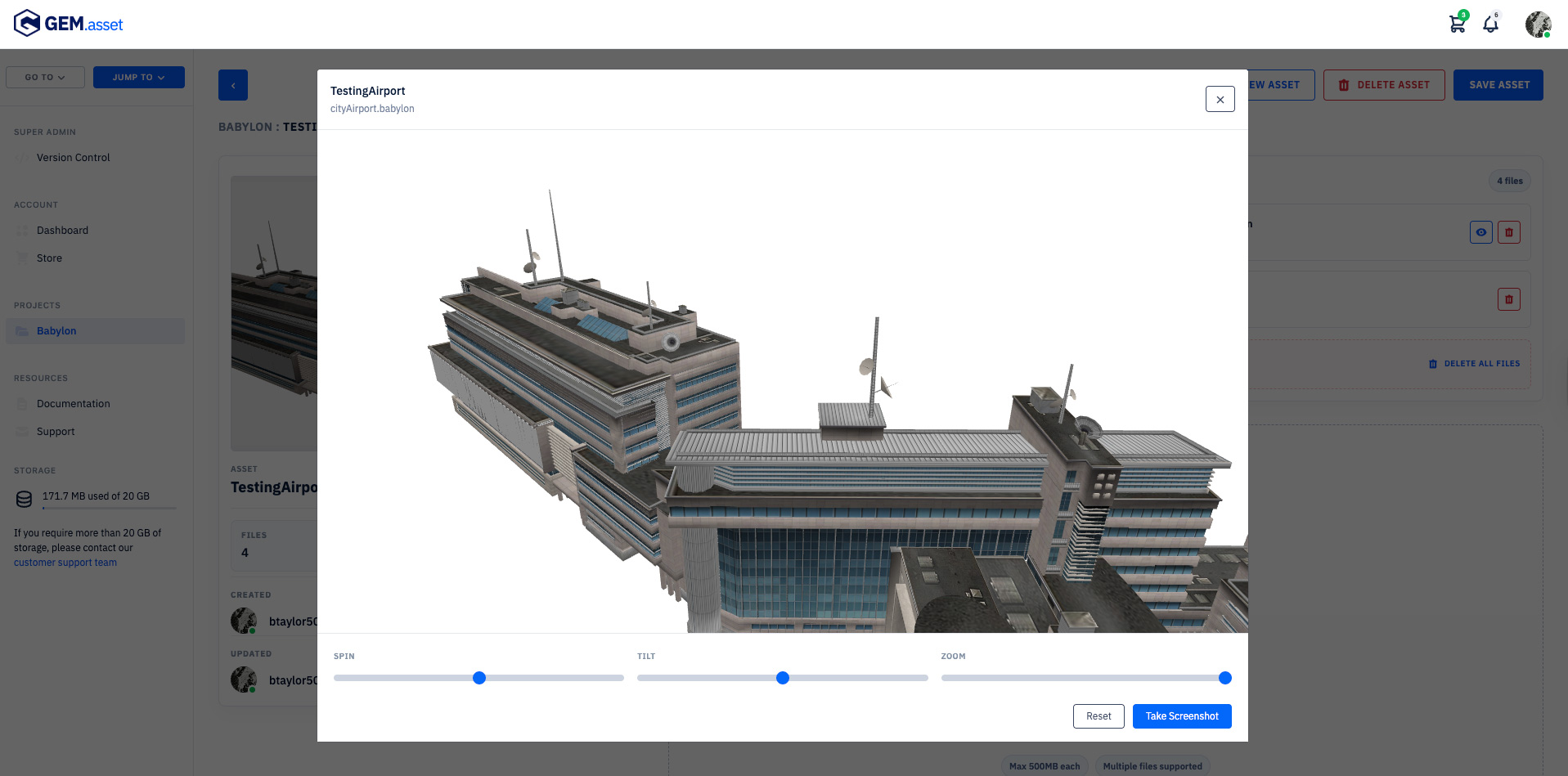
Asset Management
Drag And Drop.
Drag And Drop.
Keep Moving.
Upload asset models, inspect them, and save to your asset library without leaving the GEM workflow.
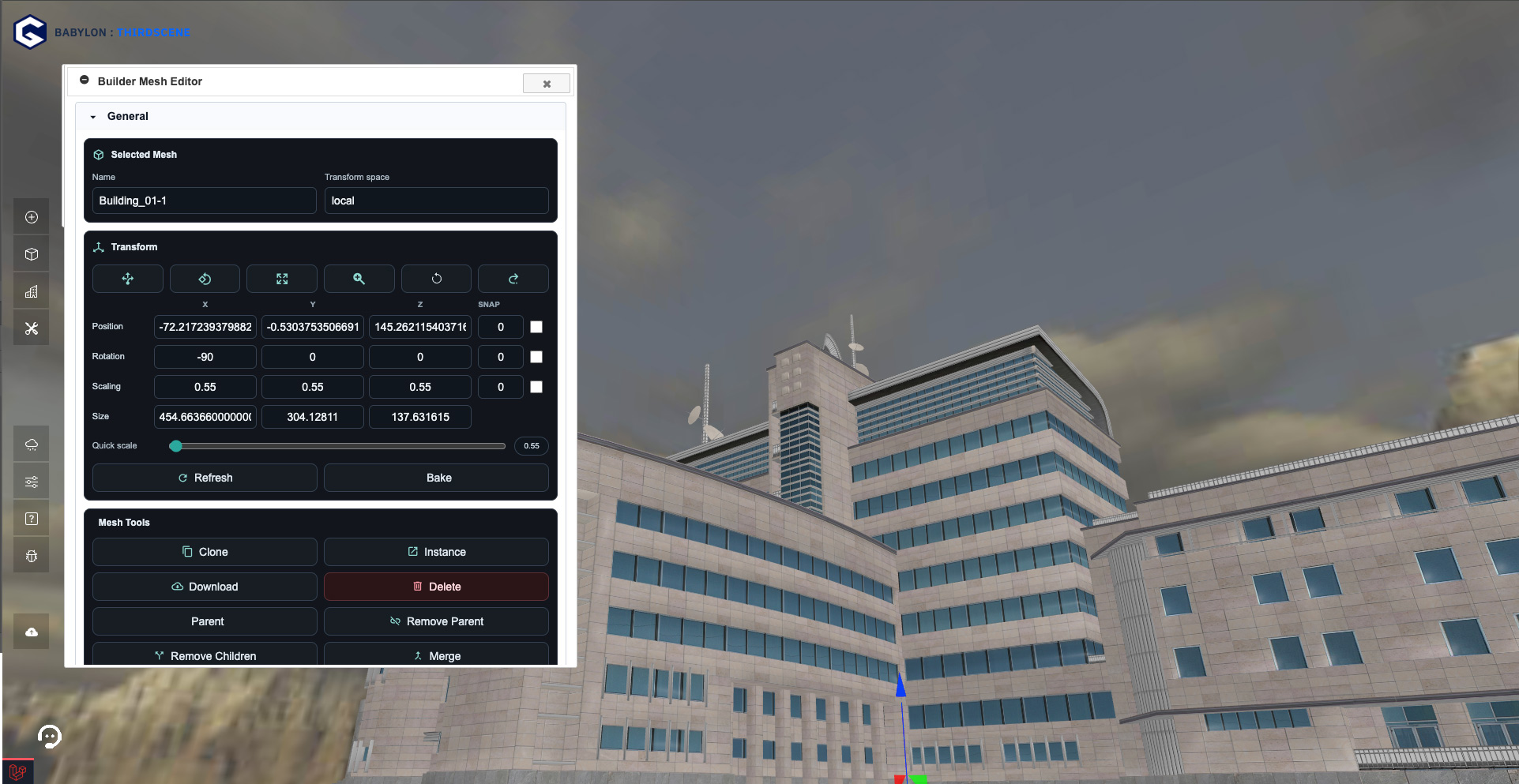
Real Builder Workspace
Build directly inside your scenes.
Select a mesh, tune transforms, adjust materials, and shape the world while the full experience stays alive behind the tools.
Inside The Builder
And More
The builder combines scene tools, realtime systems, and publishing workflows into one connected workspace.
If you are new to GEM, the builder is how your project becomes a playable web experience. Start with a scene, add assets, then open editor panels when you need to adjust lighting, objects, water, motion, and more.
01
Start your project
Choose the project type, default scene, assets, sounds, and features you want GEM to turn on.
02
Shape the world
Drag in assets, place meshes, sculpt terrain, set lights, tune materials, and preview the result as you build.
03
Publish a version
When the scene feels ready, GEM prepares the runtime config, thumbnails, scene data, and CDN files.
04
Put it on the web
Add the loader to your site, initialize your project key, and keep extending the experience with GEM JavaScript APIs.
General
Selected Mesh
Transform
X
Y
Z
Snap
Mesh Tools
Scene State
Physics
Behavior
Material
Lights
Sounds
Quick Animations
Mesh Editor
Adjust every detail until the scene feels right, with the tools and controls at your fingertips.
The mesh editor is the everyday object tool. Use it when a building, prop, platform, avatar, or imported asset needs positioning, behavior, material, sound, or physics.
Transform
- Move, rotate, scale, focus, undo, redo, snap, and quick-scale objects.
- Rename objects and update exact position, rotation, scaling, and size values.
Object Tools
- Clone, instance, download, bake, or delete selected meshes when needed.
- Parent meshes, remove parent links, merge objects, or split reusable pieces.
Scene Behavior
- Control collision, visibility, disabled state, and scene behavior flags.
- Assign a selected mesh as the avatar or ground when the scene needs a new foundation.
Click Actions
- Attach actions that load scenes, play sounds, toggle visibility, open URLs, or send custom signals.
- Stack multiple actions on one object and reorder them as the experience grows.
Attached Systems
- Open materials, sounds, behavior, lights, physics, sensors, and animations.
- Tune object settings without leaving the focused mesh workflow.
Lighting
Day Cycle
Active
Environment
Set the mood of the scene.
Use Environment when you want the whole world to feel brighter, darker, calmer, or more alive. Lighting, sky, fog, time of day, and ambient sound live together here.
- Move the sun and adjust brightness, shade, fog, ambient color, and camera FOV.
- Preview sunrise, day, sunset, and night while you are building.
- Add day and night sound loops so the scene changes as time passes.
- Jump into skybox, sea, and terrain setup when the world needs more shape.
Water
Edit Water
Add water that belongs in the scene.
Use the water controls when your project needs an ocean, lake, pool, or stylized surface without hand-building a shader.
- Adjust wind force, wave height, wave length, wave speed, and wave count.
- Tune color, transparency, depth color, bump height, and layered wave detail.
- Switch between world-space waves, Fresnel split, and unlit water options.
- Open water settings directly from Environment once a sea mesh exists.
Path
Start
x 0.0, y 1.4, z -2.0
Roof landing
x 10.4, y 16.2, z 5.5
Playback
Quick Animations
Make objects move with simple paths.
Quick Animations are for doors, lifts, platforms, rides, scene reveals, and shared moments. Set waypoints, choose how it starts, and let GEM handle playback.
- Build a path from a start point and as many destination points as you need.
- Start automatically, start when clicked, repeat, fade, or reverse on the next click.
- Let visitors ride local click animations for vehicles and moving platforms.
- Broadcast one-click animations when every visitor should see the same moment.
The builder keeps going.
Mesh editing, water, environments, and animations are only part of the toolkit. GEM's mission is to deliver practical controls around the things teams need to build polished web experiences.
Scene Deployment
Asset Control
Sound Management
Team Collaboration
Version Control
Pricing
Only pay for what you use.
GEM runs on tokens, so your costs follow real usage instead of a fixed monthly platform fee. Add tokens to your account, publish projects, and let GEM measure the services your scenes actually consume.
Usage rolls up daily across project activity like scene delivery, hosted assets, realtime events, signups, users, sounds, and builder-managed resources. Realtime events include chat, avatar movement, broadcast animations, and other live features.
Starter Credit
$30
Free tokens when you sign up and start building.
1
Buy Tokens
Top up from the GEM store whenever your account needs more balance.
2
Build And Publish
Use hosted assets, scenes, chat, avatars, sounds, and realtime features.
3
Daily Rollup
GEM calculates usage each day and deducts from your token wallet.
No monthly platform fee. No unused seat math. Just usage you can review and manage.
Usage pricing Token rollup details GEM measures the services your scenes consume and rolls up usage across your projects every day and deducts from your token wallet.
Storage
1 token per 100 MB of project storage.
1 token per 100 MB
API Boots
1 token per 10 project boots.
1 token per 10 boots
API Signups
1 token per API signup.
1 token per signup
Autobahn Events
1 token per 250 realtime events.
1 token per 250 events
Advertising Campaigns
10 tokens per active ad campaign per day.
10 tokens per active ad campaign per day
Advertising Boots
1 token per 50 advertising boots.
1 token per 50 ad boots
Advertising Broadcasts
1 token per 180 advertising broadcasts.
1 token per 180 ad broadcasts
API Users
1 token per 10 API users.
1 token per 10 users
Scenes
1 token per active scene.
1 token per scene
Assets
1 token per active asset.
1 token per asset
Sounds
1 token per 5 active sounds.
1 token per 5 sounds
Your Creative Guide
Meet Mira.
Mira is your friendly guide inside GEM. She helps you learn as you build with quick walkthroughs and simple tips. Have a question? Just ask Mira and she’ll help point you in the right direction.
Coming September 2026
From Our Blog
View Blog
Updates, guides, and ideas from the GEM team.

Step Inside What You’ve Built.
We tested GEM in VR on Meta Quest 3, and the takeaway is exciting: the worlds you create in GEM are not trapped on a flat screen. With WebXR-capable headsets, a published GEM scene can become a place people step into, explore, share, and discover through GEMGO.io.
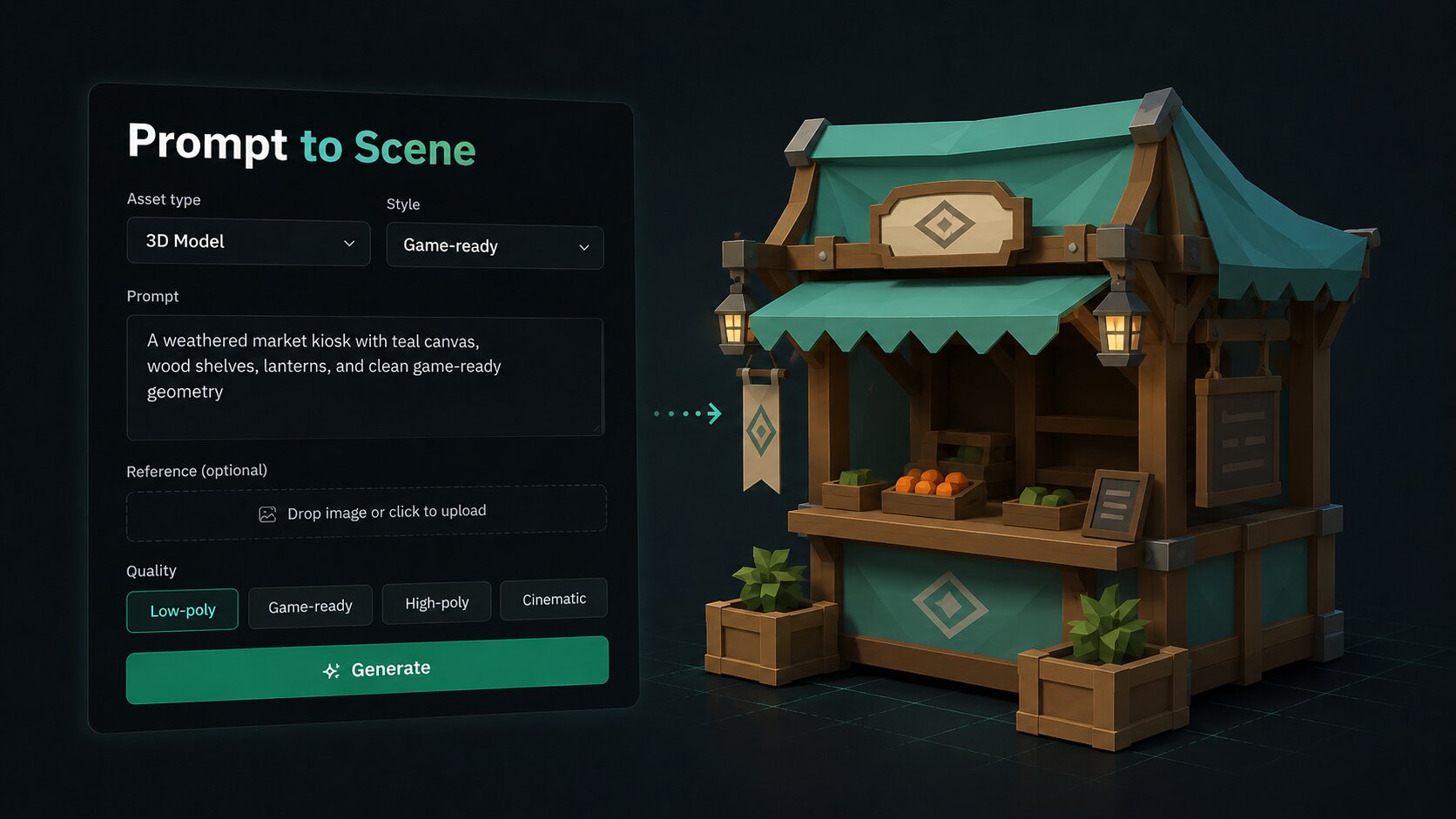
Just Say What You Want: Meet GEM Forge
GEM Forge brings AI asset generation directly into the builder. Start with a prompt, generate, and place a ready-to-use 3D model into your scene without breaking your flow.

Introducing In-Scene Advertising for GEM
GEM’s in-scene advertising tools let creators place dynamic image and video ads directly inside interactive 3D environments. Campaigns, rigs, events, broadcast logs, and token estimates work together to make immersive advertising feel native, manageable, and measurable.

What Is the Autobahn?
Interactive worlds depend on more than rendering — they depend on systems communicating in real time. In this post, we explore the Autobahn, GEM’s high-speed runtime communication layer designed to synchronize services, stream content on demand, and power connected interactive experiences across the platform.
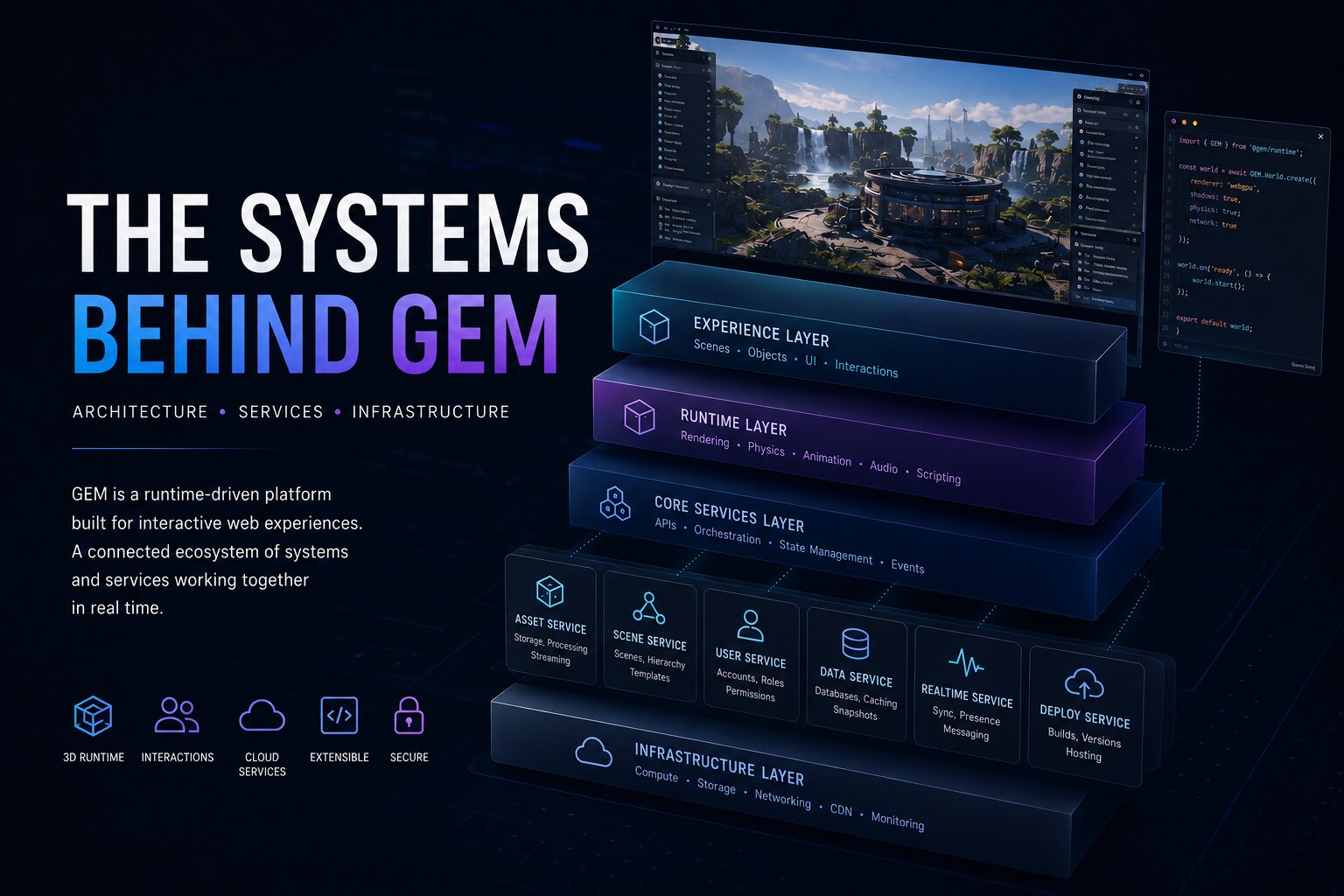
The Architecture and Services Behind GEM
Behind every immersive web experience is a network of systems working together in real time. In this post, we explore the architecture and services behind GEM — from scene systems and runtime orchestration to asset pipelines, APIs, and scalable infrastructure designed for interactive web worlds.
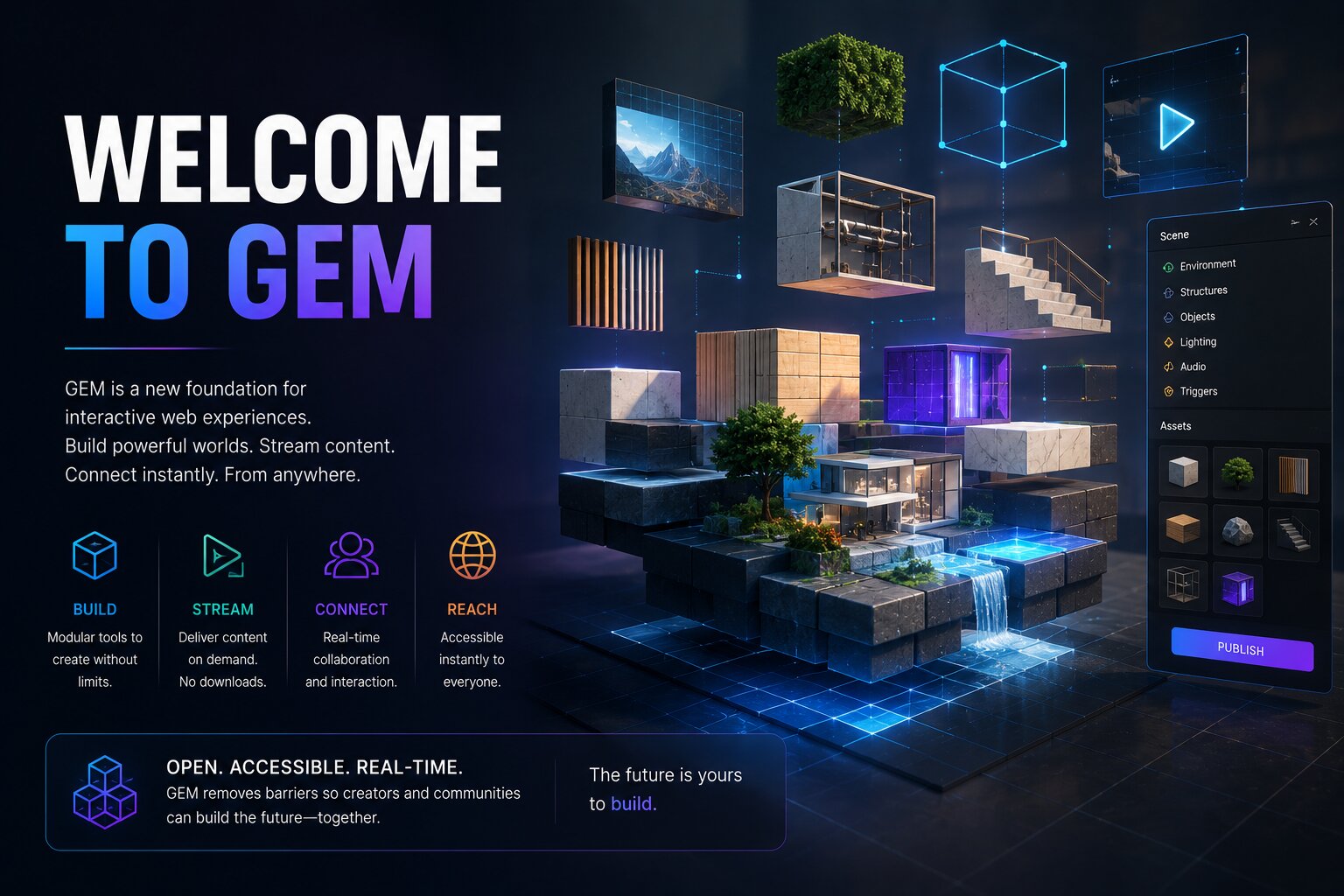
Welcome to GEM
GEM started as an idea for an online commerce game, but quickly evolved into something bigger. After building the tools needed to create immersive web experiences — scene systems, editors, asset workflows, and runtime infrastructure — it became clear the platform itself could help other creators build beyond traditional websites. GEM is focused on making interactive, scalable web worlds more practical to create, directly in the browser.
Ready when you are.
No credit card required. Create an account, get your free tokens, and start building something amazing today.
Games
Storefronts
Art galleries
Virtual campuses
Product showrooms
Music venues
Training worlds
Community hubs
Interactive portfolios